Linking Mobile and Web App Sessions to Your Backend
Shipbook shows your mobile or web app's logs and your Node.js backend's logs in one chronological timeline. Your iOS, Android, Flutter, React Native or browser app adds one header to the requests it sends to your backend. Each backend request then appears inside the app session that made it, with its route, status code and duration, and with the backend logs it wrote.
Watch it find a real bug: a checkout that failed in the app while the API returned 200 OK.
What is session linking?
When your client app calls your own backend, two Shipbook apps see the same user action from different sides: the client app records the app session, and your Node.js backend records server sessions. Session linking connects the two — all requests from one app session are grouped into a single backend session that remembers which app session it belongs to, and the console shows both sides as one combined flow, in time order.
In that one view you get:
- the app's logs, as the user produced them
- every backend request the app made, with its method, route, status code and duration
- the backend logs written while handling each request, inside that request's block
So when a user reports "the checkout button did nothing", you see the tap in the app, the request it sent, the 500 the backend returned and the backend log line that explains it, in order, without matching timestamps across two tools.
Both apps must belong to the same Shipbook account.
Client side
After Shipbook starts and logs in, the SDK knows its session identity. Attach it to every request you send to your own backend with getSessionHeaders():
- iOS
- Android
- Flutter
- React Native
- Browser
With URLSession, add the headers to each request:
var request = URLRequest(url: URL(string: "https://api.your-backend.com/checkout")!)
request.httpMethod = "POST"
for (name, value) in ShipBook.getSessionHeaders() {
  request.setValue(value, forHTTPHeaderField: name)
}
With OkHttp (and Retrofit, which uses it), add an interceptor once:
val client = OkHttpClient.Builder()
  .addInterceptor { chain ->
    val request = chain.request().newBuilder()
    ShipBook.getSessionHeaders().forEach { (name, value) -> request.header(name, value) }
    chain.proceed(request.build())
  }
  .build()
Spread the headers into each request:
await http.post(
  Uri.parse('https://api.your-backend.com/checkout'),
  headers: {'Content-Type': 'application/json', ...Shipbook.getSessionHeaders()},
  body: jsonEncode(cart),
);
import Shipbook from '@shipbook/react-native';

await fetch('https://api.your-backend.com/checkout', {
  method: 'POST',
  headers: {
    'Content-Type': 'application/json',
    ...Shipbook.getSessionHeaders()
  },
  body: JSON.stringify(cart)
});
With axios, set it once as a default:
axios.interceptors.request.use((config) => {
  Object.assign(config.headers, Shipbook.getSessionHeaders());
  return config;
});
import Shipbook from '@shipbook/browser';

await fetch('https://api.your-backend.com/checkout', {
  method: 'POST',
  headers: {
    'Content-Type': 'application/json',
    ...Shipbook.getSessionHeaders()
  },
  body: JSON.stringify(cart)
});
With axios, set it once as a default:
axios.interceptors.request.use((config) => {
  Object.assign(config.headers, Shipbook.getSessionHeaders());
  return config;
});
Browser apps also need the CORS setting below.
getSessionHeaders() returns a single x-shipbook-session header, or no headers until login completes — so adding it is always safe. Treat the header value as opaque: Shipbook may change its format, and the SDKs pass it through unchanged.
CORS
For browser apps, x-shipbook-session is a custom header, so your backend must allow it in its CORS configuration:
Access-Control-Allow-Headers: x-shipbook-session
iOS, Android, Flutter and React Native apps are not subject to CORS and need no configuration.
Server side
Nothing to configure. If your Node.js backend uses the Shipbook Express middleware or NestJS interceptor, it already reads the x-shipbook-session header. Linked requests are grouped by app session, ahead of any custom session extractor you configured; requests without the header are grouped as before.
Viewing the full flow
When you open a linked session in the Logbook, a banner above the logs tells you it is part of a flow:
- on a client session: This session made requests to Orders API · View full flow
- on a backend session: Triggered by a Web App session · View full flow
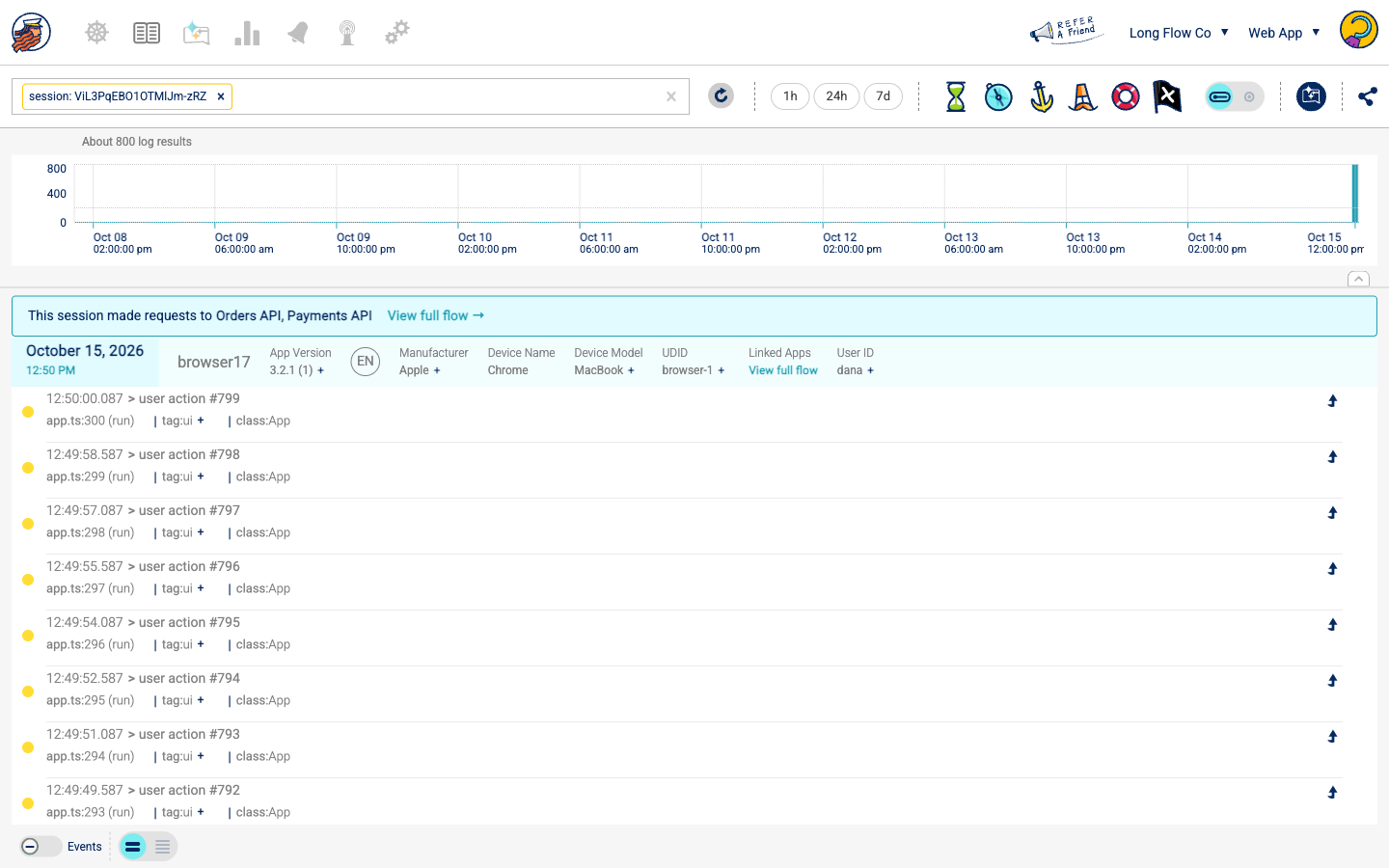
View full flow opens one timeline with the client logs and the backend logs together:
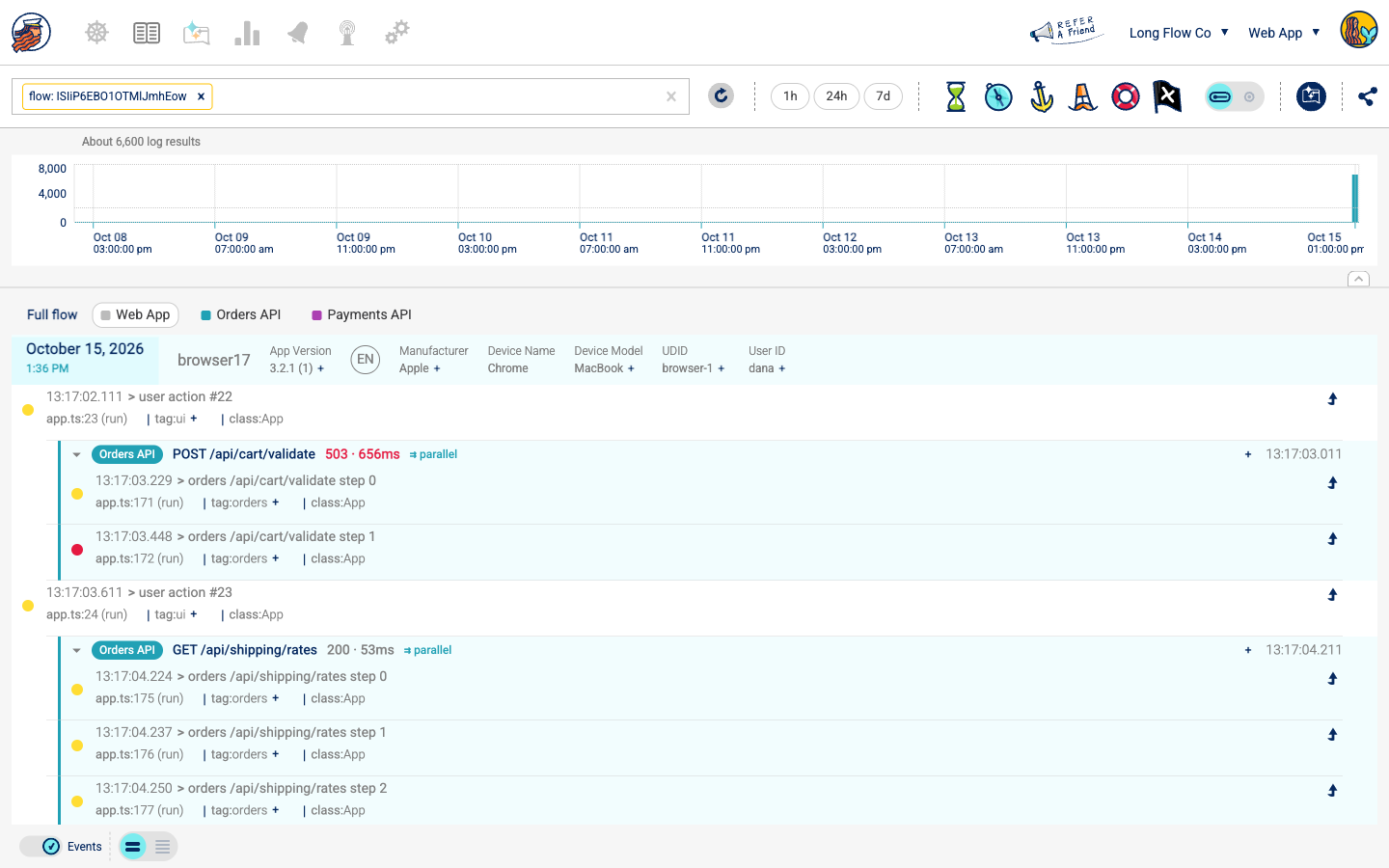
- The session panel at the top stays on the client app session — the one you're analyzing. Click a backend app in the legend to see its session's details (host, version) instead.
- Client app logs sit on the left; backend logs are indented in a colored lane, one color per backend app.
- Each backend request is its own block, headed by the request: method and route (
/api/orders/:id), status (5xx in red), and duration. Requests that ran in parallel never mix — each block holds only its own logs, and ⇉ parallel marks a request that overlapped another one. - Click a request header to collapse its block, or + to show only that request.
- no response recorded means the request started but never finished (for example, the process crashed or the request hung).
- A request appears even when it wrote no logs, so a silent failing call is still visible.
The flow scrolls like the rest of the Logbook, however long the session: it loads page by page, and a block that started earlier always stays together.
Requests in a backend session
On a web server the request is the unit, the way a session is in a client app. So a Node.js session in the Logbook reads request by request even outside a flow: under the session header, each request is a block headed by its method, route, status, and duration — collapsible, with ⇉ parallel on overlapping requests, and + to show only that request. With Events on, each block also shows the request's Request Start and Request End.
Requests are also what a Node.js app is measured in: its dashboards, release health and Loglytics error rates count requests, not sessions, so a linked backend session shows up in the numbers as the requests it handled.
To link to a flow directly:
https://console.shipbook.io/<accountId>/<clientAppId>/logbook?flow=<sessionId>&range=all
Either side's session id works — a backend session id opens the same flow as its client session.
Notes
- Each linked app session maps to one backend session per backend app; the request blocks separate the individual requests inside it.
- Each request writes two small events — its start and its end — which count toward your log quota like any other event.
- The link is recorded on the backend session at ingest time. Requests sent before the client SDK finished logging in carry no header and stay unlinked.
- Devices that are silenced (disabled in the console, or over the daily log limit) don't send the header, since their sessions aren't persisted.
How this differs from distributed tracing
Tracing tools correlate a mobile request with a backend trace by propagating trace context, which usually means setting up a mobile monitoring product and a backend tracing product together. You then read spans: timings of the request and the work under it.
Shipbook links at the session level instead. You add one header to your app's requests, and you read logs: the app's own logs before and after the request, and the backend's logs while it handled it, in one timeline. Your existing trace headers keep working alongside it.
FAQ
Does session linking work with native iOS, Android and Flutter apps?
Yes. The iOS, Android and Flutter SDKs, like the React Native and browser SDKs, provide getSessionHeaders(). Add its header to the requests your app sends to your backend, as shown in Client side.
Do I need to change my backend code?
No, as long as your Node.js backend uses the Shipbook Express middleware or NestJS interceptor. Both read the x-shipbook-session header automatically.
Can I see network latency and server status codes next to my app logs? Yes. Every backend request in the flow is headed by its method, route, status code and duration, with 5xx responses in red, placed in time order among the app's logs.
What if a request never reaches my backend? It doesn't appear as a backend request, because no backend session recorded it. The app's own logs around the call are still in the flow, so log the failure in the app to see it there.
What does it add to my app and my backend? The app adds one short header to each request. The backend writes two small events per request (its start and its end), which count toward your log quota.